Как пользоваться WASEL Pro L2TP VPN для Windows Mobile
Start from home screen.
Open "Start" menu then go to "Settings"
Go to "Connections" and click on "Connections" once more
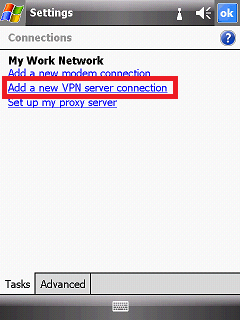
Choose "Add a new VPN server connection"
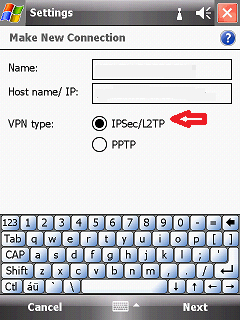
For "Name" type the servers address you would like to connect to (fr.waselpro.com for example)
For "Host name/ IP" type the server address again (fr.waselpro.com)
For "VPN type", choose "IPSec/L2TP"
For "Authenticate IPSec/L2TP connections using", choose "A pre-shared key" and insert the following word: sharedsecret
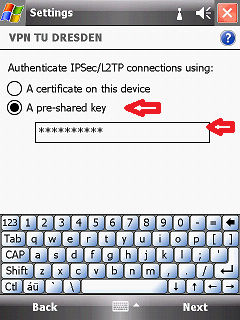
Click "Next"
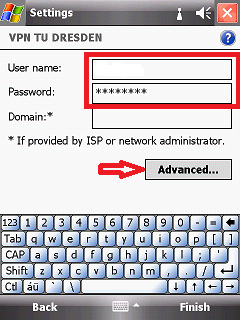
For "Username", type your WASEL Pro's registered e-mail
For "Password", type your WASEL Pro's password
Click "Advanced" and make sure that "TCP/ IP" are default.
Now, switch to "Servers" and make sure all domains are empty
Click "OK" then "Finish"
Click "Edit my VPN servers" then tap the connection you just created, hold it then choose "Connect" from the popup window.
It will take a few seconds to connect and you'll see the connection's icon in the top bar.
To make sure you're connected, open www.waselpro.com and you'll see that your IP address has changed.