How to delete browsing history in Google Chrome
1. Once your browser is opened, click on the "Customize and control Google Chrome" button (located in the upper-right corner) then select "History".
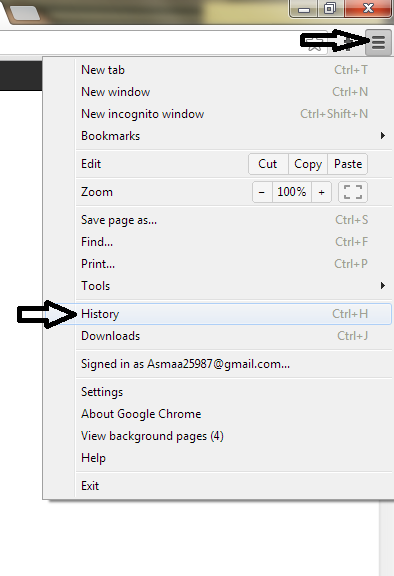
(Or you may just press (Ctrl+H) to open History menu and skip the previous step)
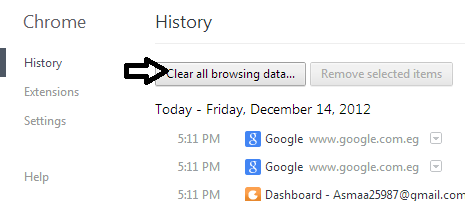
2. Click on "Clear all browsing data"
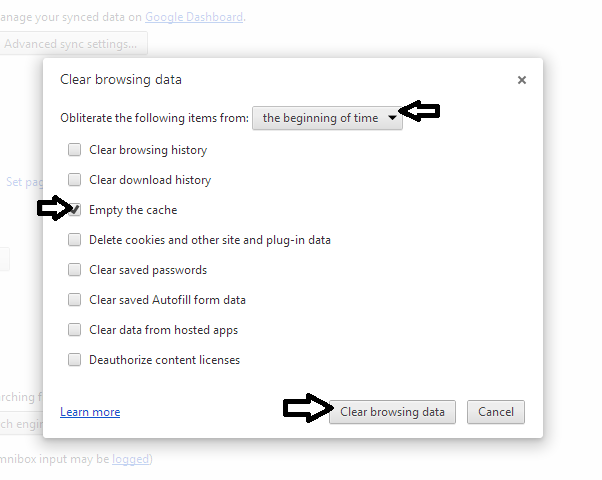
3. In the dropdown menu, select the beginning of time.
4. Select the "Empty the cache" check-box. Uncheck everything else to avoid deleting data unintentionally.
5. Click the "Clear browsing data" button.
Chrome will work for a moment, and then the process will be done. You've successfully cleared Chrome's Cache!